Features of Connections Online Photo Directories
Typical downloadable entry
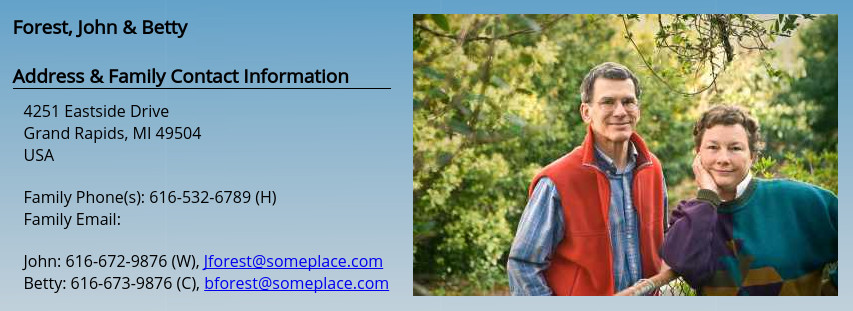
Typical Online Entry
The best way to explore the feature of Connections Online Photo Directory is to access the sample directory using user name sample and password sample.
-
The Directory is online and downloadable.
The main feature that all users can see is the online and downloadable directories, either with or without photos. The downloadable directories may be password protected to keep your directory secure. A typical entry in the photo directory is shown to the right. The default directory picture height is 1.4 inches.
The directory can list multiple emails and phone numbers.
The Directory is always current.
Each downloaded directory is based on current status of the database so the online directory it is as current as the last piece of information you added. Each PDF directory is dated so you can tell which is newer.
Your data is safe and secure
All access is controlled by user names and passwords. Users may have individual user names and passwords or groups may have a common user name and password. The downloadable PDF directories may be password protected to further secure your directory against unauthorized distribution. Data is backup daily with at least two weeks of previous data snapshots available.
Built in Photo Cropping
Photo may be cropped in your browser before being uploaded--saving you time! There is no need to re-size photos in another program before uploading. There is also a color balance feature which will improve many pictures.
First Time Access & Password Recovery
If enabled, users listed in the directory can gain access and reset their password without intervention of an administrator. They receiving a time limited one time use link that is sent to their email.
Users can submit corrections
General users can submit corrections for review through an online form that emails their description of the corrections to an email address of your choice.
Batch Imports
To get started quickly or add a large number of entries you can create an excel file and batch import all the entries at one time.
Custom Fields
You can have unlimited custom fields for individuals to meet your needs. Examples are endless: 'Membership Date', 'About', 'Favorite Quote', etc.
You have control
- Authorized users can edit information and upload current pictures at any time. Changes are tracked so you can see who changed what. The benefit is that your ministry team can pool information and several individuals are checking the correctness of the information. The "task" of creating a annual directory update is eliminated!
- Photos can easily be updated. Someone does not like their photo or a photo is dated, have them send you another!
-
Entries in the database may be publish in the down loadable directory and in search results or kept private.
- Ages of children may be displayed in the down loadable directory and in search results (this helps parents connect with others with similar age children) or they may be kept private.
- You have control over the number of users and the level of their access.
-
Directory is Searchable
General users can search on first name or last name to find individuals. This is useful if you only remember part of someone's name and need to figure out how to contact them. You know you have the correct person by their picture!
Regular searches may include custom fields.
Administrative Search Advanced searches
Authorized users can do advanced searches that lets you ask demographic questions. If you need to know how many 10 and 11 year old there are--do a search on birth dates. Wondering who lives in the same area neighborhood--do a search on the postal code.
Merge Mailing and Email Lists
Authorized users can define and maintain groups that can be downloaded in an Excel file and used with merge mailing capabilities of word processors. NEW: Address in a group can be plotted on maps to help you understand the demographic in your contact database.
Export Contacts
Using the group feature you can export a list into an Excel file which can then be imported into other programs such as OutLook.
Customizable
You can add your logo, background images and colors to the online site and you can also add a logo, a header, a cover (any PDF file), etc. to the downloadable directory.